Tuesday, December 15, 2009
Sunday, December 13, 2009
Thursday, December 10, 2009
Monday, December 7, 2009
Saturday, December 5, 2009
Thursday, December 3, 2009
"Response to point, shoot, retouch and label?"
1. In response to this paragraph, I agree and disagree with different sentences, to be specific. In the first sentence, where it states "Some think such a law would destroy photographic art," I couldn't agree more. Other than me agreeing with that, the first issue I believe is that photographs are supposed to be naturally beautiful no matter the subject. The photo should be the PHOTO, not the photo, and ten different names following it. Each photograph is beautiful because of the characteristics and what makes it different than any other, it should be appreciated for what it is, not what it would be if it were photo-shopped to look "better." About the anorexia thought, I think that magazines and advertisements have a big influence on girls and directly aim things at them like "How to look good in your new bikini this Summer, and how to get rid of what you THINK is baby fat." Girls under 18 especially should not be dieting or eating bits of food in a whole day, their bodies are simply not developed fully and a 14 year old girl starving herself might become weak and frequently fatigued because of the impact the lack of food is having on her undeveloped and growing body.
I think that retouching an image can be on various levels. Making a woman's legs the size of pencils is certainly different than inducing the bright colors of an outfit that she is advertising. There are plus size models out there as well, who are just as beautiful in many viewers eyes, and I once read in a health article, "Is skinny beautiful?" In the article, it discussed that you can be a full figured person yet still be healthier than that 90 pound person. The reason of this is that being healthy doesn't just mean not being overweight, but taking in vitamins and the right nutrition to keep your body functioning properly. An anorexic girl or woman may believe that since she is 90 pounds(or less!) she is more beautiful than she was before, when she was 130 pounds, yet she is weak, sleeps all day, and sometimes may vomit by the look of food. That is unhealthy, and is also a disorder that may need counseling to help them cope once they know they have a problem. Magazines definitely have a huge effect with being skinny and that possibly making you "hotter than ever," but this time, the fine print isn't there at all.
2. I believe the author is the person who brainstorms ideas for taking photos and puts his or her thoughts into an experiment before taking the photo. I believe an author is a creator, which shows they are creative and have a mind that can expand, with much thinking. I think the photographer of the photo is the person who held the shutter down as the subject was viewed through the lens. The author and photographer may in some cases be the same person, but photographers often view ideas from other photographers, making them no longer the author of the photo that THEY will be taking, them as the photographer. In another case, there could be a family photo, and don't have a tripod and have no where to place the camera for self timer, so they ask some average Joe on the street to take the photo, so he is the photographer, he photographed the family. The model is the subject being viewed through the lens. The model doesn't necessarily have to be a person, for instance, it could be a dog. The retouch-er of the photo is the person who is sitting behind the computer, who chooses the options of what to retouch. The magazine editor is similar to the re-toucher, they both believe they will make things look better and do their best to fulfill their thought. There are many different people that are involved in the "photography world" and especially in magazines, more than one person is involved in getting that picture taken all the way to having it be printed out in the booklet.
Tuesday, December 1, 2009
Thursday, November 26, 2009
Thursday, November 19, 2009
Monday, November 16, 2009
Photoshop Review
Question One: What are the three types edits that we have learned and in what order did we complete these edits for the Frame within a Frame project? Why do we edit photographs in this order?
1. levels/curves
2. photo filter
3. vignetting
** You edit in this order because levels/curves adjusts the simple contrast and brightness of the picture. Levels must come first because you want to check how "even" the contrast and coloring is in the photo, if the graph spans the whole display area when you open areas, you have a good photo to start from, and probably won't need much editing. The photo filter uses those selections and may tone the photo, or add a color to make the photo look good and neutralized, it helps you regulate the white balance of the photo. Vignetting is like the last touch that is for enhancement of the subject, and needs to be done last because it will be dark around the corners, and you wouldn't want to edit contrast/colors before that.
Question Two: What are the “quick keys” for: Move Tool, Crop Tool, Brush Tool, Text Tool, and Mask Mode. We did not go over the “quick keys” for Mask Mode in class, find the answer through your own research.
**Move=V
**Crop=C
**Brush=B
**Text=T
**Mask Mode=Q
Question Three: What are the “short-cuts” for Select-All, Inverse-Selection and Deselect-Selection. (Ctrl + ?, if you work on a PC, or Command + ?, if you work on a Mac.)
**Select All=Ctrl+a
**Inverse selection= Ctrl+shift+i
**Deselect selection=Ctrl+shift+d
Question Four: Write all the steps necessary to create vignetting. Do not forget to write what Brush Mode we use, and what percentage of opacity, hardness and flow we use to paint the mask.
**Open a photo in photoshop.
**Type the letter B, to make sure you are in "brush mode"
**At the top, click next to where it says brush, on the black dot
**Choose a thick brush, and while looking a the picture, increase the "master diameter." Make sure the circle in the photo does not touch each edge, but fits within the frame equally.
**Now, type in 0% for Hardness.
**At the bottom of the tool palette, 3 rows up from the bottom, click on the circle on the right, the red one.
**Use the circle and move it around the photo to create an even "mask" of red over the picture, keeping the edges free of red.
**Now, click on the dot next to the red one on the tool palette.
**Next, On computer number 7, hit Ctrl+shift+I.
**You will see a dotted circle of the area that you masked.
**Open curves(Go to image-->adjustments-->curves), then adjust the line and look at the photo to see how much darkness you are adding around the edges.
**When you are satisfied, click OK.
Question Five: When you open a JPEG in Photoshop, how many layers do you start with, and what are they / is it called?
One, it is called background.
Question Six: Which of these buttons on your Layers palette do you press to make a new edit layer (curves, levels, color balance, etc.)? Which of these buttons do you use to delete a layer?
**Make a new edit layer= Black/White cookie button.
**Delete a layer=Drag layer to trash bin.
Question Seven: How do you “turn off” a layer / make it invisible?
**Click on the eyeball.
Question Eight (Extra Credit): Find a poorly Photoshopped image on the web a la the NYT article we read in class. Post it to your blog, and explain what went wrong.

Wednesday, November 11, 2009
Tuesday, November 10, 2009
Story Telling. Due 11/16/09

1. What is the first thing you notice in this photograph?
- The first thing I notice is the stairs, and the back wall, because the stairs are ascending up the wall.
2. Do you think the woman is dead or alive? If she is alive, what kind of emotions does she appear to be experiencing?
- I think the woman is alive. The emotions she is expressing could easily be depression, sadness, and maybe guilt.
3. At what time of day do you think this photograph was taken?
- I think this was taken midday.
4. What are the light sources in this photograph?
- The light sources seem to be natural light, sunlight.
5. How would you describe the environment or room here?
- The room in this photo is "dark" and appears to be a sad mood. It is very messy and things are out of place. The disorganization may show how the woman's life is going at the moment, and her laying on the floor, in water, adds to the "sad" theme.
6. What objects do you see on the steps leading upstairs?
- I see slippers, a robe, and a nightstand as well. Pictures are hanging on the wall.
7. Is the female subject wearing shoes?
- The female is not wearing shoes, her slippers are on the stairs, and it is almost as if she wants to trick people into believing she is dead.
8. The title of this piece is “Ophelia.” Do some quick research… what is the history of the name “Ophelia” in literature?
-Ophelia is a fictional character in the play Hamlet, by William Shakespeare. A possible historical source for Ophelia was Katherine Hamnet, a woman who fell into the Avon River and died in December 1579. Eventually, it was concluded that she had overbalanced while carrying some heavy pails, but rumors went around saying that she was suffering from a broken heart. These rumors were considered plausible enough for the thought of her death being a suicide.
Sunday, November 8, 2009
Friday, November 6, 2009
Tuesday, November 3, 2009
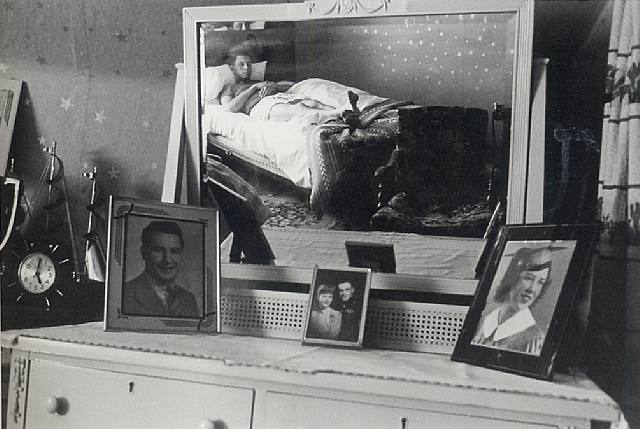
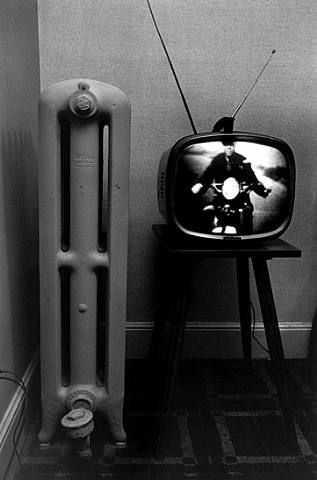
11/2/09 Frame Within A Frame

~The image above has one interior frame. The viewer will automatically pay close attention to the man sitting in the front seat.

~There are four interior frames in this photo. The three pictures frames represent the interior frames as well as the mirror. The Interior frames are attracting the viewer to the photos within the picture frames as well as the man laying in the bed. The first frame is of a man, where as the second picture frame will attract the viewer to see a man and woman, and lastly, the frame to the right shows a portrait of a woman. The mirror is bigger, but the photo overall seems to be balanced.

~There is one interior frame in the photo, which is the TV screen. The TV screen is an interior frame that attracts my attention to the man on the motorcycle in the screen.
Thursday, October 22, 2009
Camera Guide 10/22/09

I just got a new puppy. I am playing with her out in the backyard. It is around 3:00pm and I want to take some pictures of my puppy because she is running around and just looks so cute!
I pick up the camera and put the camera strap around my neck. I turn the camera on by the power switch. I adjust the diopter, next to the viewfinder, so that it is good for me.
I want to catch my puppy running so that everyone can see her excitement! In order for me to do that, I will need to make the shutter speed fast. I also want to make it so that my puppy is the only thing in focus, it IS all about her! To change the shutter speed, I use the the main command dial and look at the control panel screen, located near the power switch. The number will increase as I turn the dial, and I stop when I get to 500, this should be quite enough to capture my lovely puppy in action! To change the aperture(which will change what is/how much is in focus) I use the sub-command dial and look on the control panel screen, next to the letter F, to see the aperture size. Since I want my puppy, and my puppy ONLY in focus, I will use a big aperture(that is a smaller number) so that everything around my puppy is blurred, yet she is in focus. I will adjust the dial until the number next to the letter F is 3.5. My ISO setting will be low, I will set it at 400, depending on the camera, it could be in menu, or in another setting place. I will use 400 because it is fairly low and since there is daylight, I do not need a high ISO. For white balance, I will use the "sunny" setting. With this setting, the picture will not come out extremely bright. The orange pigment will combine with the blue to create a crisp, color-perfected picture. Once the settings are set, I make sure the camera is in auto-focus, and then I press the shutter release half way down to get the subject in focus....THEN....I PRESS DOWN ALL THE WAY!! CONGRATS to me, I have captured the beautiful puppy. Now.....I look at the amazing picture, and smile.
:D
Tuesday, October 20, 2009
5

1. Gregory Crewdson, Untitled, Unknown
2. SS~~400--when viewed larger, the fire seems to be captured, and everything else as well, such as moving trees.
3. F~~11, there is not one main point of focus in general, the whole image seems to be clear.
4.ISO~~800, the image seems to have no noise present and is clear.
4
3

1. Gary Winogrand, unknown, 1964
2. SS~~~ 250, it seems to be, when the picture is enlarged, that the people are walking, and with this shutter speed, this can be captured.
3.F~~~22, everything in the picture is in focus
4. ISO~~~800, there seems to be a little noise in the photo, it is not as crisp as it could be.